How to Recover a Forgotten Password in a Mikrotik CHR Instance on a VDS
Locked out of a Mikrotik CHR with no SSH, no backups and a changed password? Here is how to recover access by editing the password-salt and password-verifier directly in the VM disk image.

One day I discovered that a Mikrotik CHR instance of mine, running on a VDS, had locked me out. It had worked without a hitch for years — until one fine day I decided to change something on it. As it turned out later, I had changed the password away from the one stored in my KeePass database, or else I'd used a different password manager, and I hadn't enabled SSH access either, since I had always administered the box through WinBox … and the only access left to me was the hypervisor console … where something resembling a CHR login prompt showed up, but no credentials would let me in. So what do you do? Searching the forums and so on turned up nothing useful, i.e. no solution. Queries to AI didn't suggest anything either. Is it a lost cause, or is there still something that can be done?
There is, in fact, a way out. The password for a user in Mikrotik is encrypted as follows:
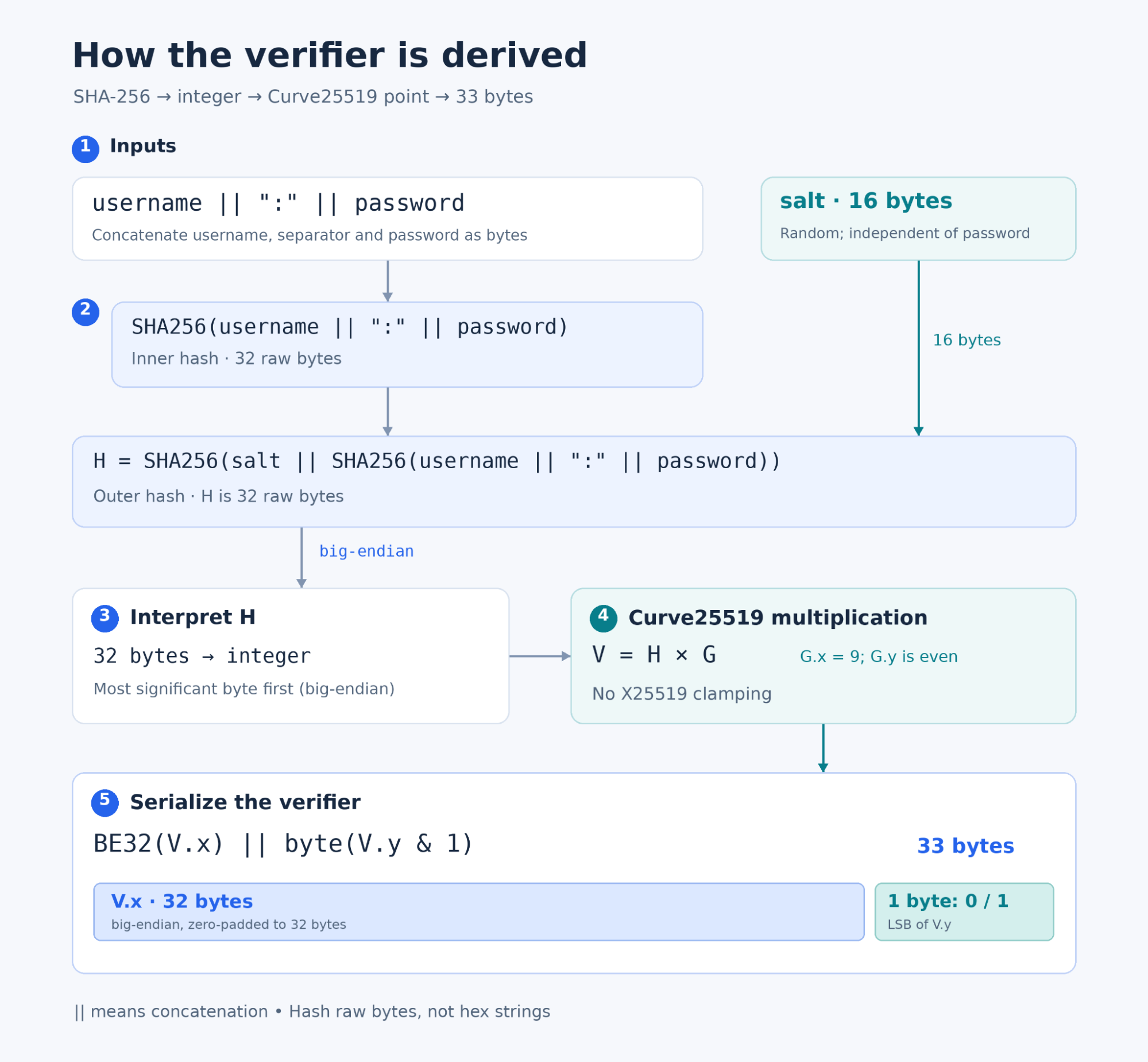
password-salt and password-verifier.As we can see, at a minimum password-salt and password-verifier are stored in a special format. So I’ll show you how to locate these values in our disk image and replace them with known ones.
The mandatory prerequisite is that you must be able to download your VM’s disk image to a local machine, that the data in it is stored as raw rather than in some kind of compressed format (or that you can convert the downloaded disk to raw using your hypervisor’s utilities or some other tool). In my case the test Mikrotik image had been set up under VirtualBox, so I simply took the disk image chr-7.24.5.vdi and opened it in a hex editor. By the way, I recommend hiew.io from SEN.
Let’s assume our user’s login was admin — which, well … is the obvious one. In the hex editor we search for the hex sequence:
01 00 00 21 05 61 64 6D 69 6EHere 01 00 00 21 is the header, 05 is the length of the username, and 61 64 6D 69 6E is the string admin encoded directly.
There may be several of these username occurrences in the disk image, so I’ll also show you how to find the right one.
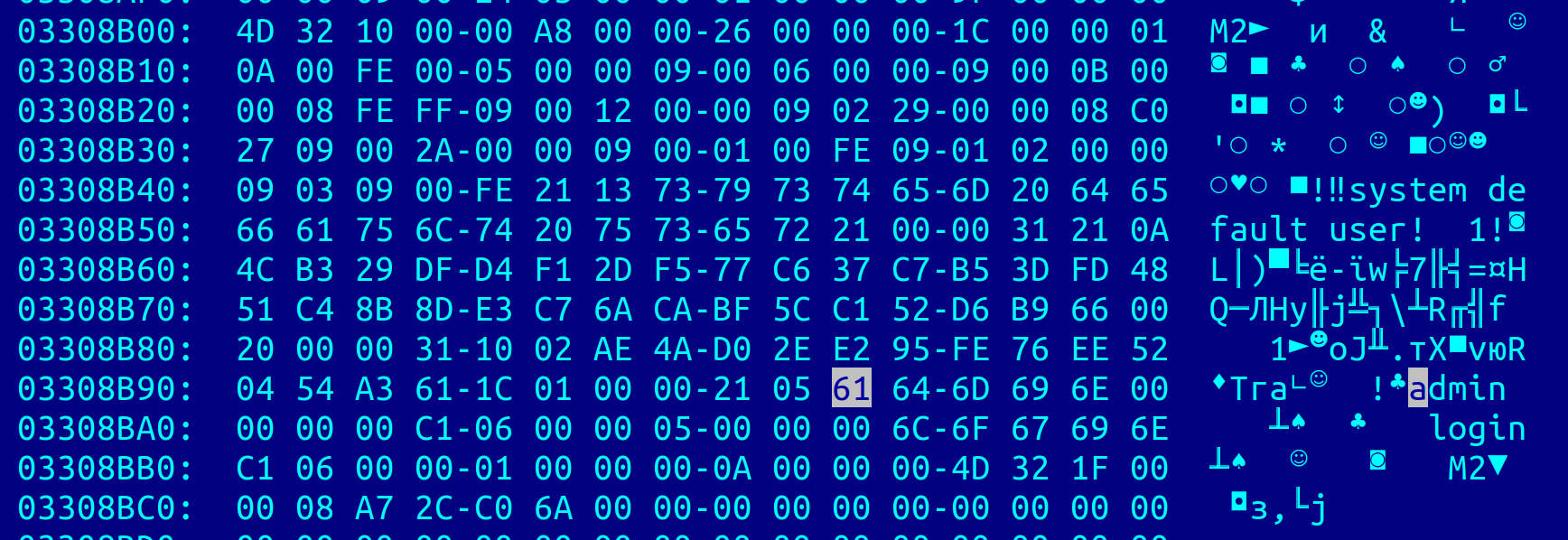
Next to this value (though not necessarily immediately adjacent) you should see the string literal login, and to the left of it — the byte arrays. We pay attention first of all to the byte sequence that follows admin … We’re looking for the pattern 20 00 00 31 10 [16-byte salt] — that is the password-salt. In our case, here is that very fragment:
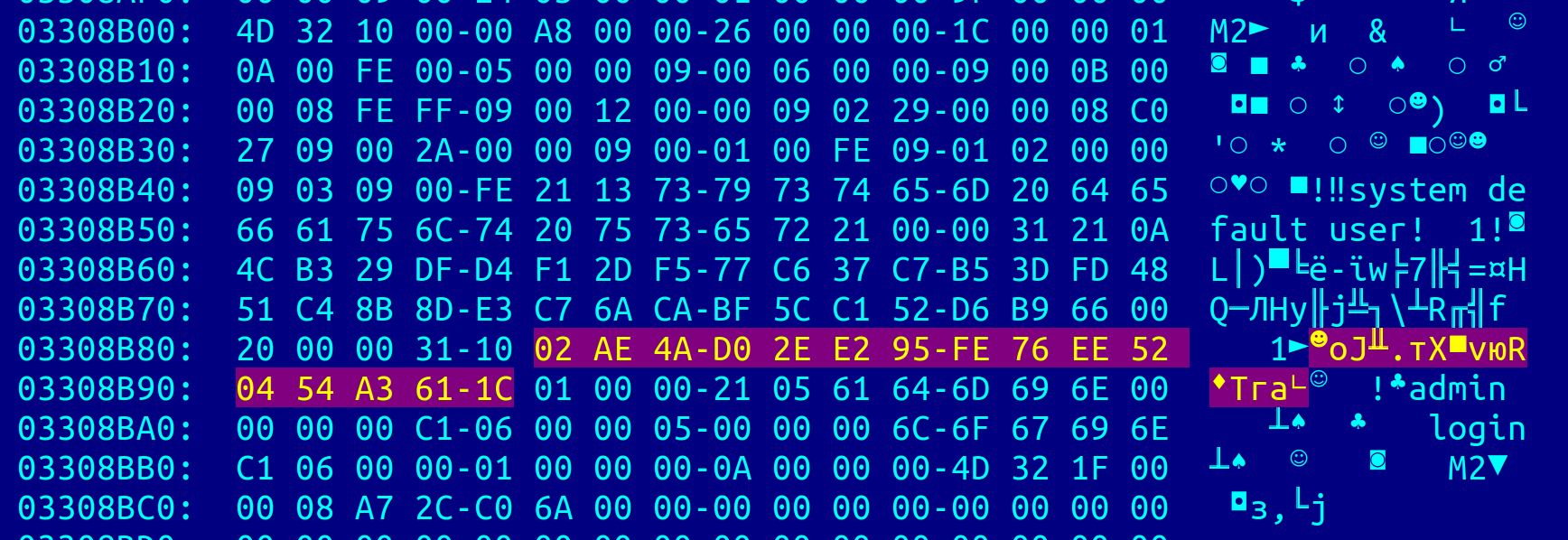
password-salt: the pattern 20 00 00 31 10 followed by 16 bytes.A little further to the left we find the pattern 21 00 00 31 21 [33-byte verifier] — that is the password-verifier:
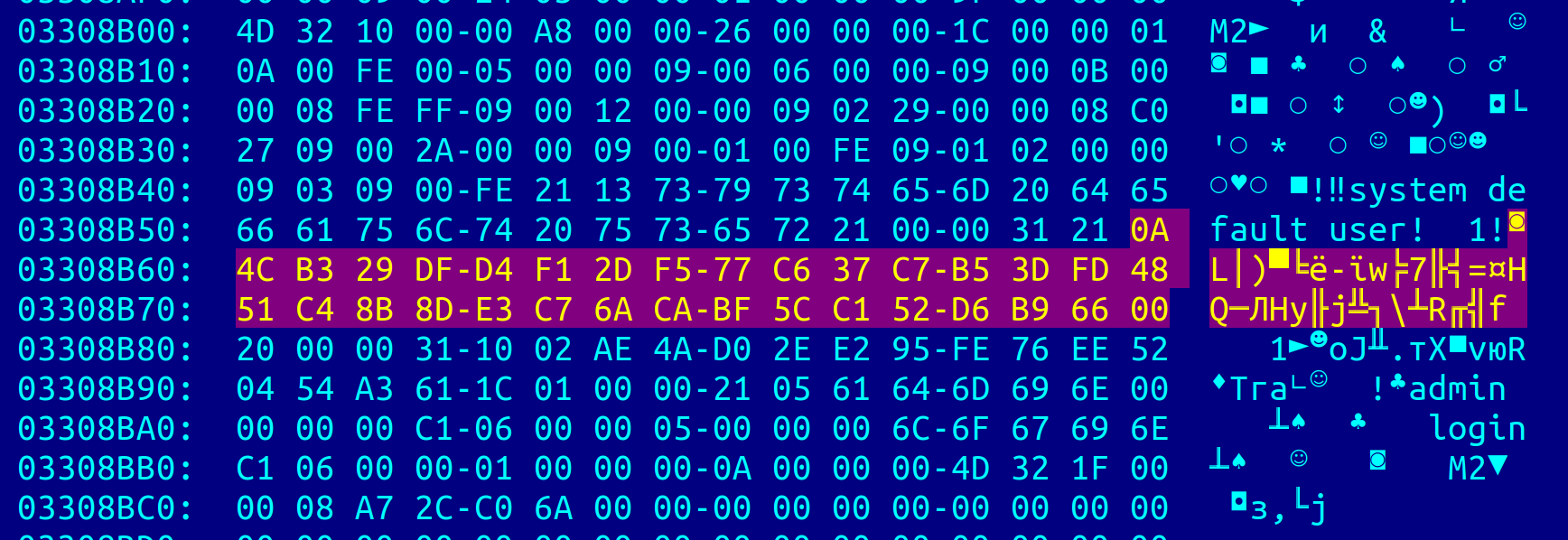
password-verifier: the pattern 21 00 00 31 21 followed by 33 bytes.Our task now is to replace these two values — the salt and the verifier — with known ones. But how do we work out the known values of the salt and verifier? For this we can use the script routeros_password.py, which I wrote. We run it like so:
python3 ./routeros_password.py --password decker admin"""
routeros_password.py (c) 2026, Decker
"""
import argparse
import getpass
import hashlib
import json
import secrets
P = 2**255 - 19
A = 486662
ORDER = 2**252 + 27742317777372353535851937790883648493
def _base_point():
rhs = (9**3 + A * 9**2 + 9) % P
y = pow(rhs, (P + 3) // 8, P)
if y * y % P != rhs:
y = y * pow(2, (P - 1) // 4, P) % P
if y * y % P != rhs:
raise ArithmeticError('invalid Curve25519 base point')
return 9, y if y % 2 == 0 else P - y
BASE = _base_point()
def _add(left, right):
if left is None:
return right
if right is None:
return left
x, y = left
u, v = right
if x == u and (y + v) % P == 0:
return None
if left == right:
slope = (3 * x * x + 2 * A * x + 1) * pow(2 * y, -1, P) % P
else:
slope = (v - y) * pow(u - x, -1, P) % P
rx = (slope * slope - A - x - u) % P
return rx, (slope * (x - rx) - y) % P
def _multiply(scalar):
result, point = None, BASE
while scalar:
if scalar & 1:
result = _add(result, point)
point = _add(point, point)
scalar >>= 1
return result
def _bytes(value):
if isinstance(value, str):
return value.encode('utf-8')
if isinstance(value, bytes):
return value
raise TypeError('expected str or bytes')
def pwd_hash(username, password, salt):
if not isinstance(salt, bytes) or len(salt) != 16:
raise ValueError('password salt must be exactly 16 bytes')
inner = hashlib.sha256(_bytes(username) + b':' + _bytes(password)).digest()
return hashlib.sha256(salt + inner).digest()
def pwd_verifier(password_hash):
if not isinstance(password_hash, bytes) or len(password_hash) != 32:
raise ValueError('password hash must be exactly 32 bytes')
point = _multiply(int.from_bytes(password_hash, 'big'))
if point is None:
raise ValueError('point at infinity: firmware encoding not established')
x, y = point
return x.to_bytes(32, 'big') + bytes([y & 1])
def password_fields(username, password, salt=None):
if salt is None:
salt = secrets.token_bytes(16)
return salt, pwd_verifier(pwd_hash(username, password, salt))
def main(argv=None):
parser = argparse.ArgumentParser(description=__doc__)
parser.add_argument('username')
parser.add_argument('--salt', help='16-byte salt as hex; omitted: secrets.token_bytes')
parser.add_argument('--password', help='known password; omitted: prompt without echo')
args = parser.parse_args(argv)
try:
salt = bytes.fromhex(args.salt) if args.salt is not None else None
password = args.password if args.password is not None else getpass.getpass('User password: ')
salt, verifier = password_fields(args.username, password, salt)
except (ValueError, TypeError, EOFError) as exc:
parser.error(str(exc))
print(json.dumps({'password-salt': salt.hex(), 'password-verifier': verifier.hex()}, indent=2))
return 0
if __name__ == '__main__':
raise SystemExit(main())Here admin is our user’s name, and decker is the desired password, and we get something like this in return:
{
  "password-salt": "f18d2eacf008eaccaf9fe534b87da028",
  "password-verifier": "0c9f3df9799ff3ee8af4ee2373768c73941765b0a1ad423d8d65229ec3c9338001"
}
We write (i.e. edit) these bytes into the right places, directly into the disk image, so that we end up with something like this:
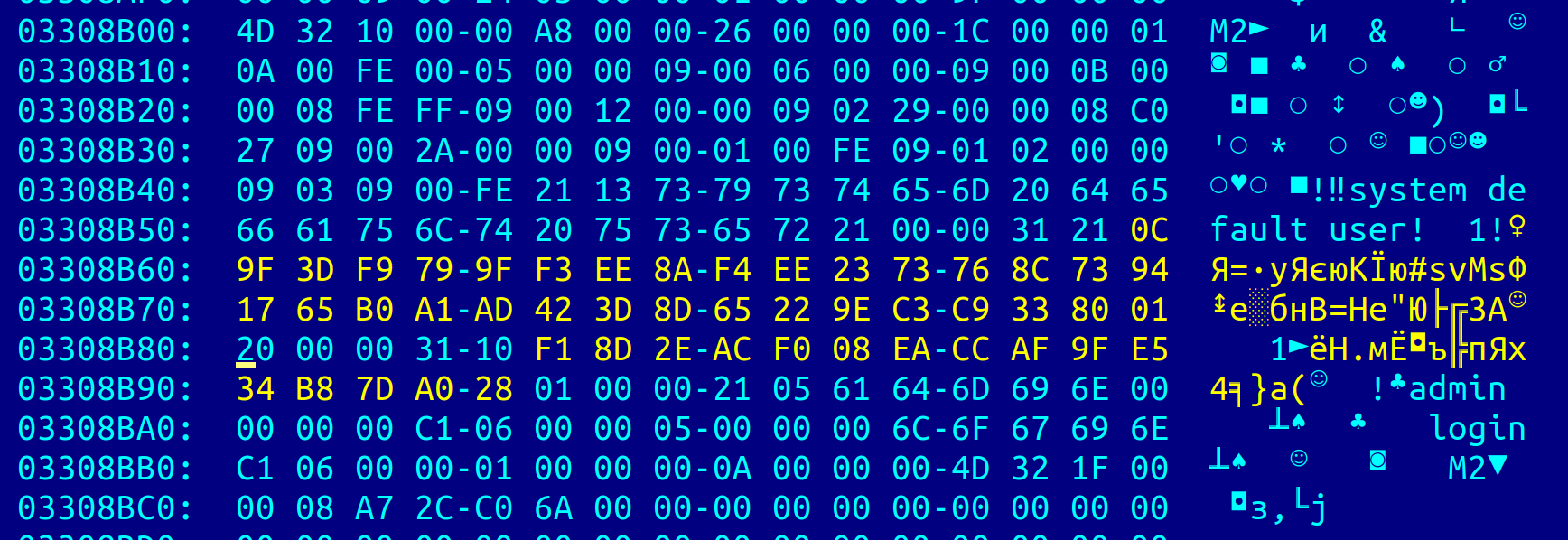
salt and verifier bytes written into their places in the disk image.We made no mistakes. We write the bytes back into the file. Once that’s done, we boot it up in our VM, enter the login admin and the password decker, and land in the console of our router:
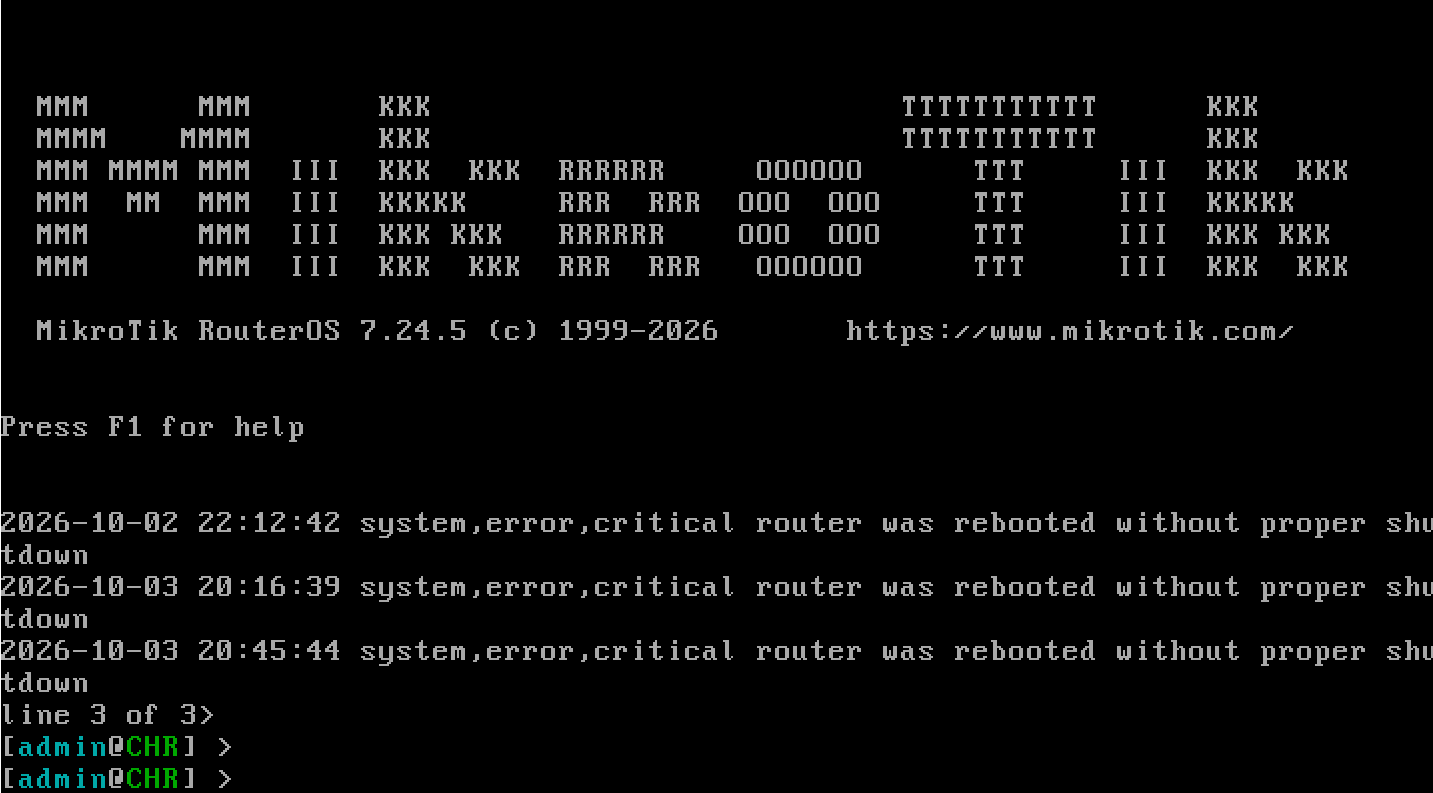
Congratulations! You can now manage your Mikrotik instance again.